TABLE OF CONTENTS
- How to add a new diagnosis
- Pre-populated Diagnosis
- Recording inactive diseases or diagnoses
- Altering or removing a disease or diagnosis
- Cardiovascular disease
This section explains how to enter a diagnosis into the interRAI Assessment Software (iAS). Refer also to the interRAI assessment form and coding manual, as they define diagnoses and explain how the codes are intended to be used.
When you enter a diagnosis on the Overview page, the data links to other parts of the person’s iAS record:
- ticking Use in MDS/Assessment will populate Section I2: Other disease diagnoses
- the diagnosis will populate reports once an assessment is marked complete
- for all assessment types, diagnoses are found in Diseases and Diagnoses History under History and Physical
- in LTCF offices, diagnoses are displayed on the Overview page.
Notes on adding new diagnoses
When adding a diagnosis:
- document any diagnosis relevant to the person’s current condition
- do not include diagnoses that have resolved or no longer affect the person’s functioning or care needs
- add each new diagnosis separately
- ensure its Status is set to Active
- tick Use in MDS/Assessment if the diagnosis is not listed in Section I1 of the assessment, as this will add the diagnosis into Section I2 for coding.
How to add a new diagnosis
Each new diagnosis must be added separately. Repeat these steps for each new diagnosis you want to add.
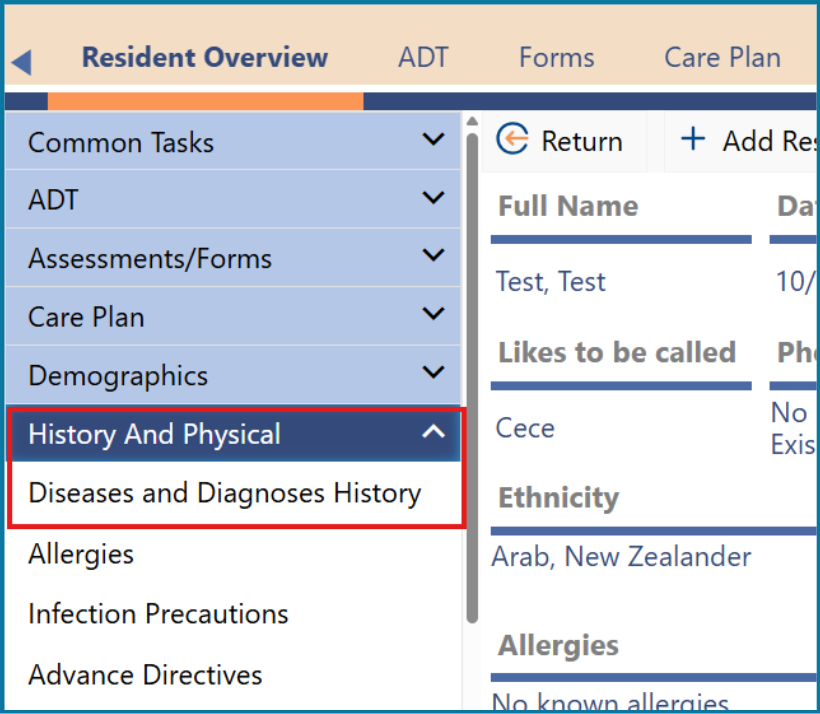
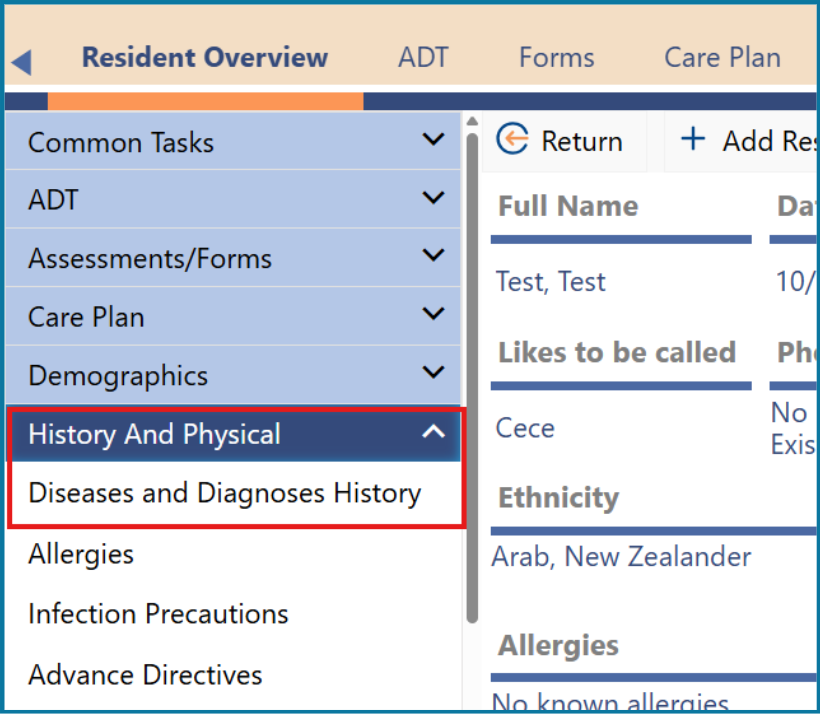
1: Click on 'Diseases and Diagnoses History' on the left-hand side under History and Physical
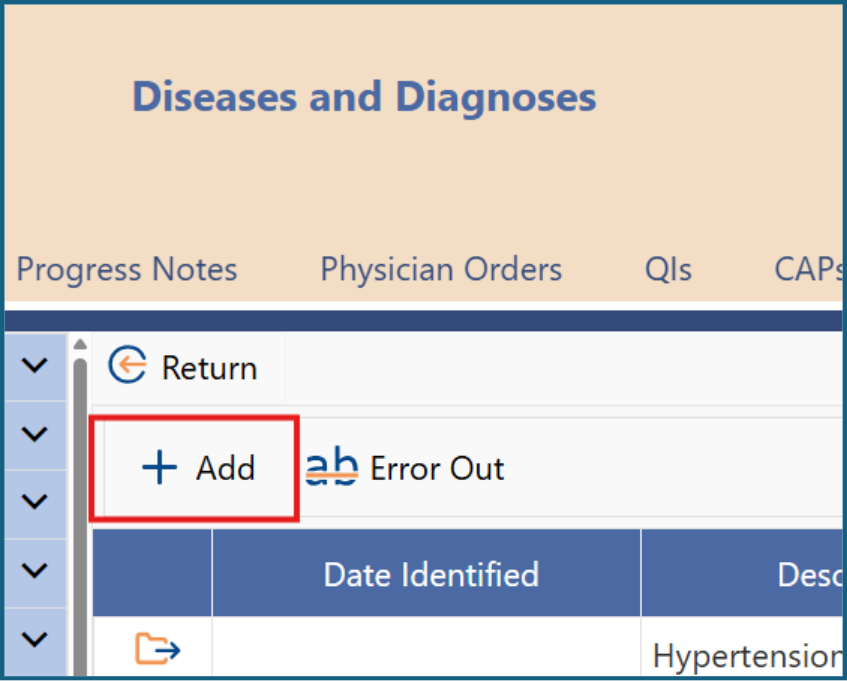
2: Click ‘Add’.
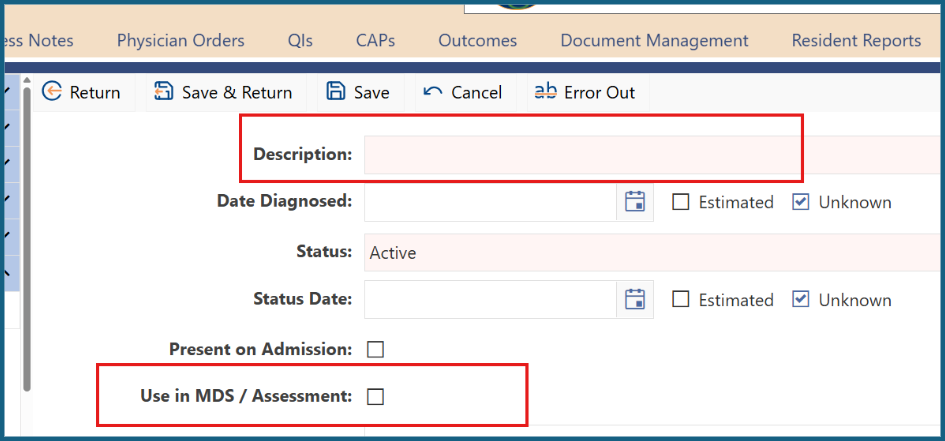
3: Type the full name of the diagnosis in the Description field. If you wish to include an abbreviation, add it in brackets after the full diagnosis. Example: Atrial Fibrillation (AF). A list of commonly used abbreviations can be found at the back of each workbook unit.
4: Add a general date the event occurred if it is in the person's notes and clinically relevant, 'Fractured left neck of femur January 2023' or 'Stroke April 2023'.
5: Tick ‘Use in MDS / Assessment’ if the diagnosis needs to be added as it is not in the pre-populated listed see below.
| Write the Description of a disease or diagnosis in full and put any abbreviations in brackets. |
![C:\Users\kaye\AppData\Local\Microsoft\Windows\Temporary Internet Files\Content.IE5\IPQ4D30K\MC900433838[1].png](https://s3-ap-southeast-2.amazonaws.com/aus-cdn.freshdesk.com/data/helpdesk/attachments/production/51293641437/original/HJGIzgIpSwk_BEqB7OAzSAbQFoC9BGJQUw.png?1775596760)
Pre-populated Diagnosis
Some diseases have already been entered into the interRAI Assessment Software.
For HC, CHA, LTCF see Table 1.1. For CA see Table 1.2.
If the diagnosis you want to enter is not in these lists, tick Use in MDS/Assessment.
For PC Assessments, all diagnoses need to be added into the assessment. Tick Use in MDS/Assessment for all diagnoses.
Table 1.1. Diagnoses pre-populated in the iAS for HC, CHA and LTCF assessments.
Diagnosis type | Diagnosis name |
Musculoskeletal | Hip fracture during the last 30 days Other fracture during the last 30 days |
Neurological | Alzheimer’s disease Dementia other than Alzheimer’s disease (includes; Vascular Dementia, Lewy Body Dementia, Frontotemporal Dementia, Alcohol related Dementia, HIV associated Dementia, Chronic traumatic encephalopathy, Mixed Dementia, Huntington’s Disease, Creuzfeldt-Jakob disease, Corticobasal syndrome, Normal pressure hydrocephalus, Progressive supranuclear palsy, Cerebral Autosomal Dominant Arteriopathy) Hemiplegia Multiple sclerosis Paraplegia Parkinson’s disease Quadriplegia Stroke/CVA |
Cardiac or Pulmonary | Coronary heart disease (includes Myocardial infarction, Angina and Ischaemic heart Disease, Atherosclerosis) Chronic obstructive pulmonary disease Congestive heart failure |
Psychiatric | Anxiety (includes generalised anxiety disorder, Obsessive-compulsive disorder, Panic disorders, Phobias, Post traumatic stress disorder) Bipolar disorder Depression Schizophrenia |
Infection | Pneumonia Urinary tract infection during the last 30 days |
Other | Cancer Diabetes mellitus |
Table 1.2 Diagnosis prepopulated in the iAS for CA
Item | Diagnosis name |
D5a | Alzheimer’s disease |
D5b | Dementia other than Alzheimer’s disease (includes; Vascular Dementia, Lewy Body Dementia, Frontotemporal Dementia, Alcohol related Dementia, HIV associated Dementia, Chronic traumatic encephalopathy, Mixed Dementia, Huntington’s Disease, Creuzfeldt-Jakob disease, Corticobasal syndrome, Normal pressure hydrocephalus, Progressive supranuclear palsy, Cerebral Autosomal Dominant Arteriopathy) |
D5c | Stroke |
D5d | Coronary heart disease (includes; Myocardial infarction, Angina, Ischaemic heart disease, Atherosclerosis) |
D5e | Chronic obstructive pulmonary disease |
D5f | Congestive heart failure |
D5g | Cancer |
D5h | Diabetes |
Recording inactive diseases or diagnoses
The Status of all diseases and diagnoses that impact on a person’s function and that can be treated should be ‘Active’.
interRAI’s intent for coding is:
…to document the presence of diseases or infections relevant to the person’s current ADL status, cognitive status, mood or behaviours status, medical treatments, nursing monitoring, or risk of death. In general, these types of conditions are associated with the type and level of care needed by the person. Do not include conditions that have been resolved or no longer affect the person’s functioning or care needs.
Some past diseases and diagnoses may have had consequences that continue to impact on a person. For example, would you record a cancer diagnosis for a person who had bowel cancer six years ago and had a permanent colostomy, but is now in remission and has regular examinations to check for any signs of cancer returning? In this situation, the cancer is in remission but continues to be monitored and colostomy care is required, interRAI considers it is relevant to the person’s current medical status. Therefore, you do need to record it.
If a diagnosis has resolved an assessor may mark a diagnosis ‘Inactive’, ‘In Remission’ or ‘Cured’; however, this resolved diagnosis will only be visible on this screen and not on the MDS/Assessment or Overview page.
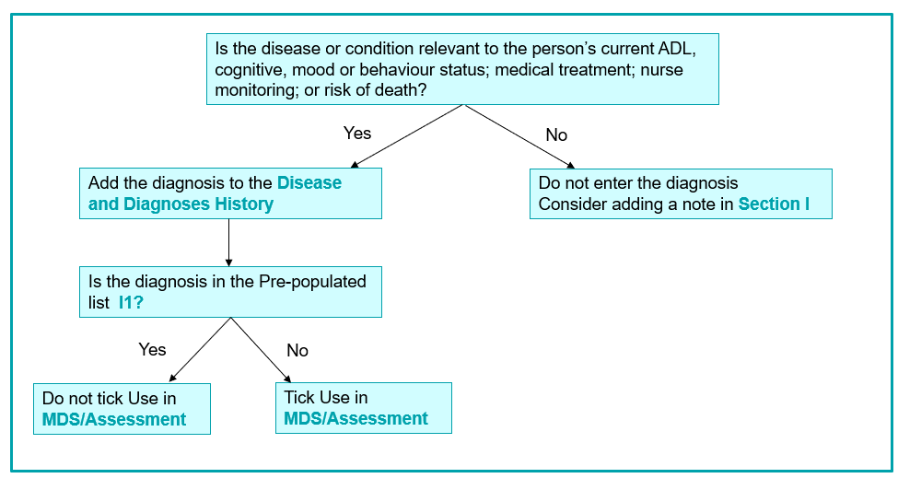
If you are unsure about whether to add a diagnosis to the person’s record, this flowchart may help you decide.
Figure 1.1. coding diagnoses
| Hint: Check your client’s medication list? Do these medications have a matching diagnosis? |
![C:\Users\kaye\AppData\Local\Microsoft\Windows\Temporary Internet Files\Content.IE5\IPQ4D30K\MC900433838[1].png](https://s3-ap-southeast-2.amazonaws.com/aus-cdn.freshdesk.com/data/helpdesk/attachments/production/51293641438/original/gXuVZamL4iSynN0LZblHr-Nqf0jn2Yr0vA.png?1775596760)
Altering or removing a disease or diagnosis
Review the person's existing diagnoses and use clinical judgement to determine if each diagnosis is still active. Some past diagnoses may still impact the person, even if they are in remission or resolved.
For example, a person who had bowel cancer six years ago and now has a permanent colostomy but is in remission would still have the cancer diagnosis recorded because it affects their current medical status.
If you need to alter or remove a diagnosis, follow these steps.
1: Click on 'Diseases and Diagnoses History' on the left-hand side under History and Physical.
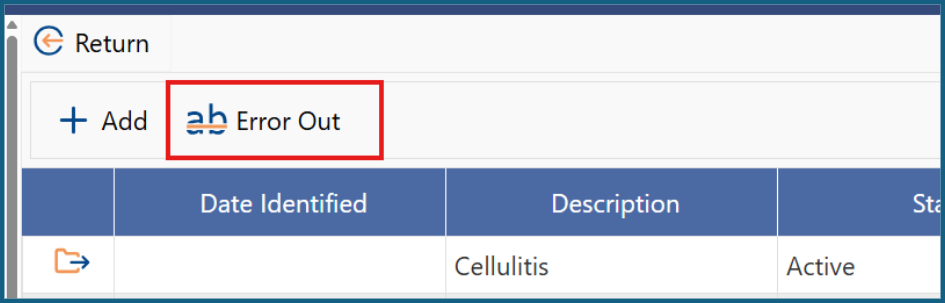
2: If the diagnosis is incorrectly entered, highlight it, then click on ‘Error Out’.
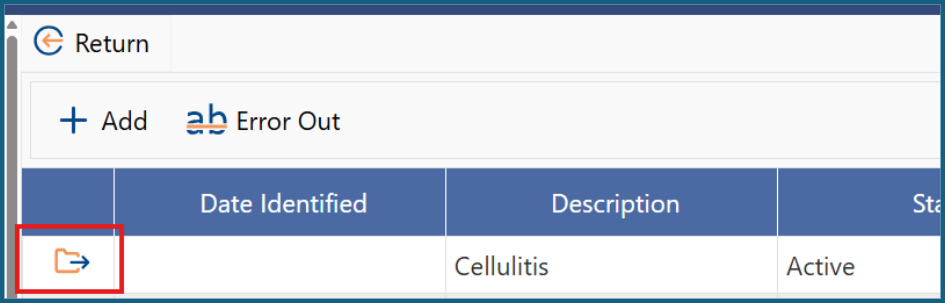
3: If the diagnosis is no longer current for the person, click on the orange folder on the left of the diagnosis.
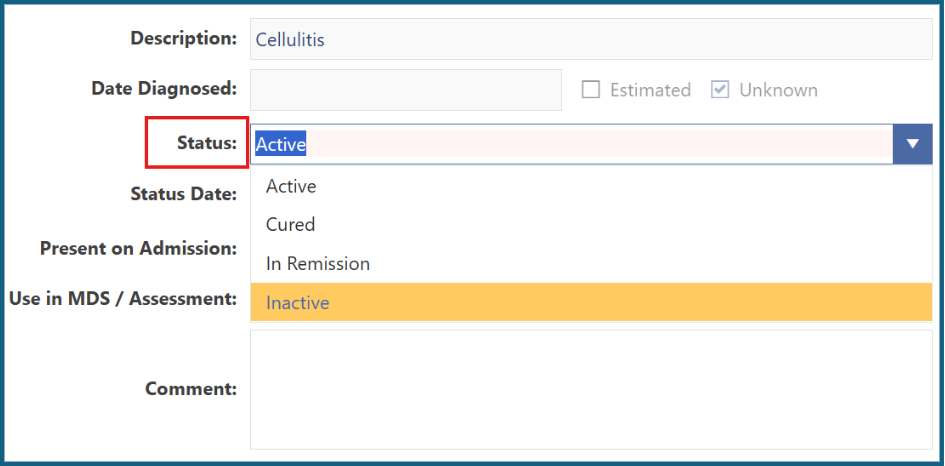
4: Change the Status of the diagnosis to Inactive, Cured or In Remission. This can be changed back later if the diagnosis reoccurs.
5: If it is ticked, untick the ‘Use in MDS / Assessment’ box.
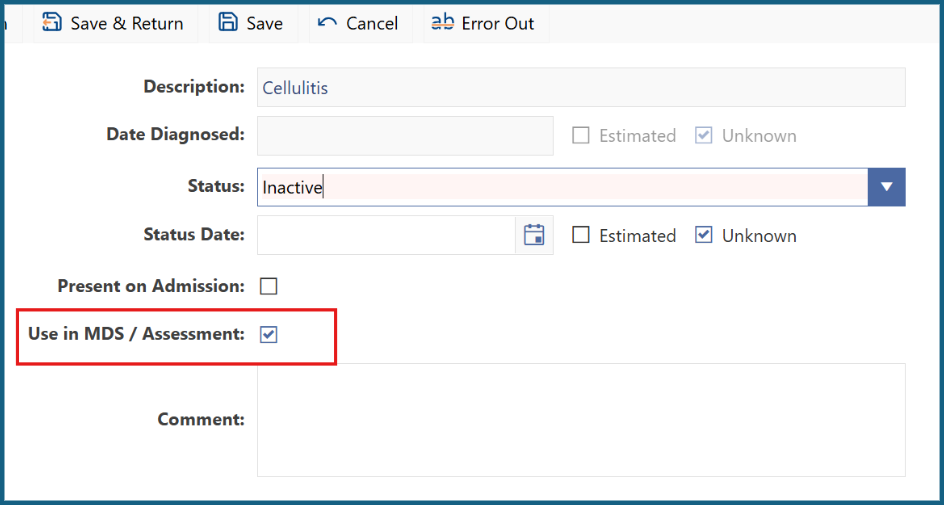
6: Click ‘Save and Return.
Cardiovascular disease
Cardiovascular disease includes all heart and blood vessel diseases. This section explains how to enter different types of these diseases in iAS.
In the HC, LTCF and CHA assessments, Section I has a list of pre-populated diagnoses, including Coronary Heart Disease and Congestive Heart Failure.
Figure 1.2. Cardiovascular diseases in the Section I1 pre-populated list and those that must be added to the assessment by ticking Use in MDS/Assessment.
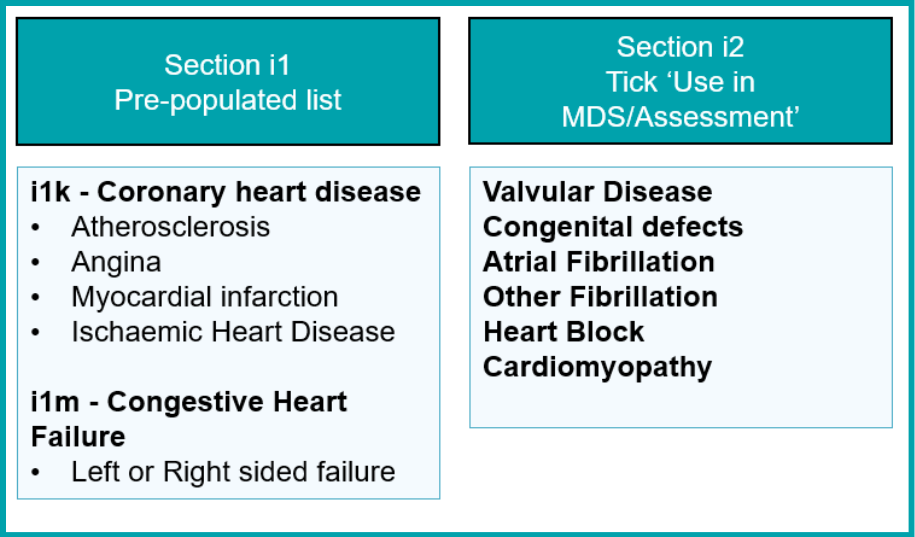
The following definitions will help you decide how to record different cardiac-disease diagnoses.
Coronary heart disease
Coronary heart disease (CHD): Plaque buildup in coronary arteries, reducing blood flow to the heart; includes angina and heart attacks. Do not tick the Use in MDS/Assessment box as these diagnoses are listed and coded in section i1.
Congestive heart failure
Congestive heart failure (CHF): Heart muscle pumping insufficiently, leading to fluid buildup. Do not tick the Use in MDS/Assessment box as this diagnosis is listed coded in section i1.
Atrial fibrillation
Atrial fibrillation (AF): Electrical defect causing irregular heartbeats. Tick the Use in MDS/Assessment box and then code this diagnosis in section i2.
Cardiomyopathy
Cardiomyopathy is a disease of the heart muscle. Tick the Use in MDS/Assessment box and then code this diagnosis in section i2.
Was this article helpful?
That’s Great!
Thank you for your feedback
Sorry! We couldn't be helpful
Thank you for your feedback
Feedback sent
We appreciate your effort and will try to fix the article