TABLE OF CONTENTS
Using this section of the interRAI Assessment Software is optional. Recording recent vital signs and observations
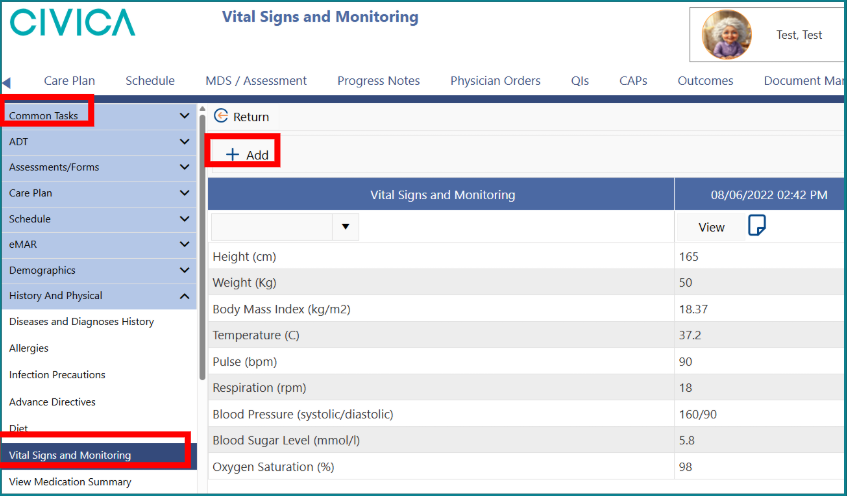
1: On the 'Client' or 'Resident Overview' page, click on 'History and Physical' under the 'Common Tasks' menu.
2: Click on 'Vital Signs and 'Monitoring'.
3: Once on the 'Vital Signs and Monitoring' screen, click on '+ Add' button.
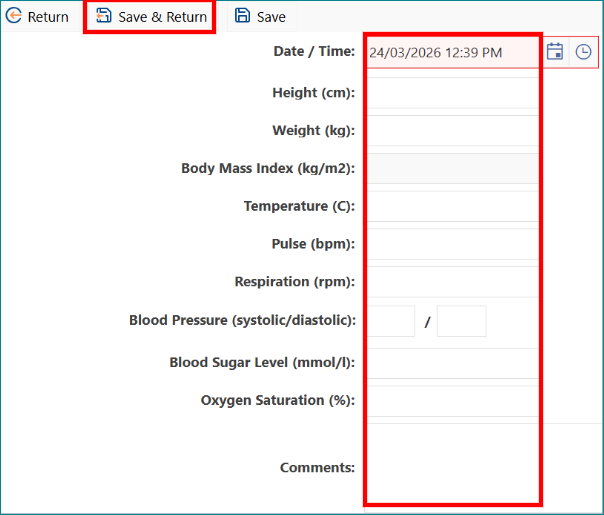
4: Enter the observation details.
5: The date will automatically enter as today’s date; however, you can change and back date the entry as required,
6: Enter values for any of the provided measures
7: Click 'Save & Return'.

Important note about height, weight, and BMI:
The interRAI Assessment Software uses the most recent values in the Vital Signs and Monitoring section, or values from the previous assessment, to calculate BMI.
This BMI value links to CAPs and Outcome Scales.
To support accurate calculation, make sure:
- the person’s height has been updated within the last 12 months.
- the person’s weight has been updated within the last 30 days.
These values must be current within the assessment you are completing.
Adding height and weight measurements to the MDS
If you have entered a person’s height and weight on the Overview page, you can update these values directly in the MDS / Assessment.
You can either:
- enter the values manually while coding the assessment, or
- use the Update Assessment values button to bring the information through from the Overview page
Recording or updating height and weight in the assessment
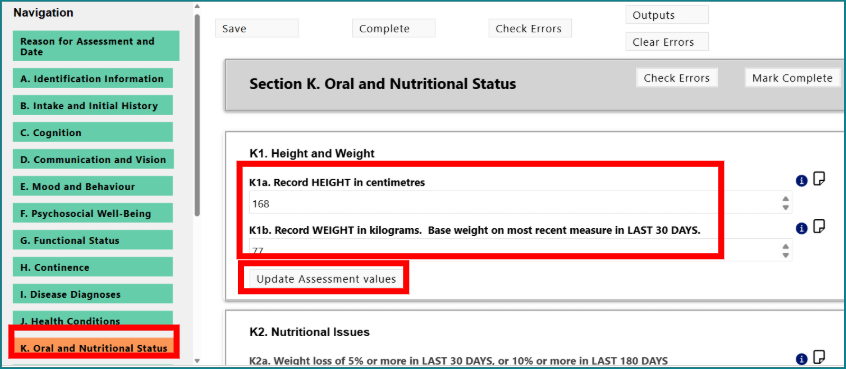
1: Once inside the 'MDS / Assessment', click the relevant section item.
For example:
- Section K1 for LTCF and Home Care
- Section D1 for PC
3: Enter the person’s recorded height and weight.
4: Alternatively, click on 'Update Assessment' values button to bring the information through from the 'Overview' page.

Was this article helpful?
That’s Great!
Thank you for your feedback
Sorry! We couldn't be helpful
Thank you for your feedback
Feedback sent
We appreciate your effort and will try to fix the article