The interRAI assessment is accessed through the MDS / Assessment tab.
MDS stands for Minimum Data Set. It is the minimum information an interRAI assessment needs to trigger assessment algorithms. In this section, you will learn how the information recorded on the Overview page affects the MDS / Assessment.
The options available to you depend on the level of access linked to your account.
- Assessors have access to all clinical and assessment-related features, as well as all reports.
- Managers have read-only access to completed assessments and full access to all related reports.
- Administrators have access to non-clinical areas, where they may need to update information and admit or discharge clients or residents.
The manager of an organisation or facility, or their administration staff, can complete sections of the Overview page at any time. However, the following sections contain clinical information and must be completed by an interRAI assessor:
- Active and recent infections tracking
- Active and recent wounds
- Advance directives
- Allergies
- Client or resident safety concerns
- Diagnoses
- Diet
- Infection precautions
- Recent falls tracking
- Recent vital signs and weight
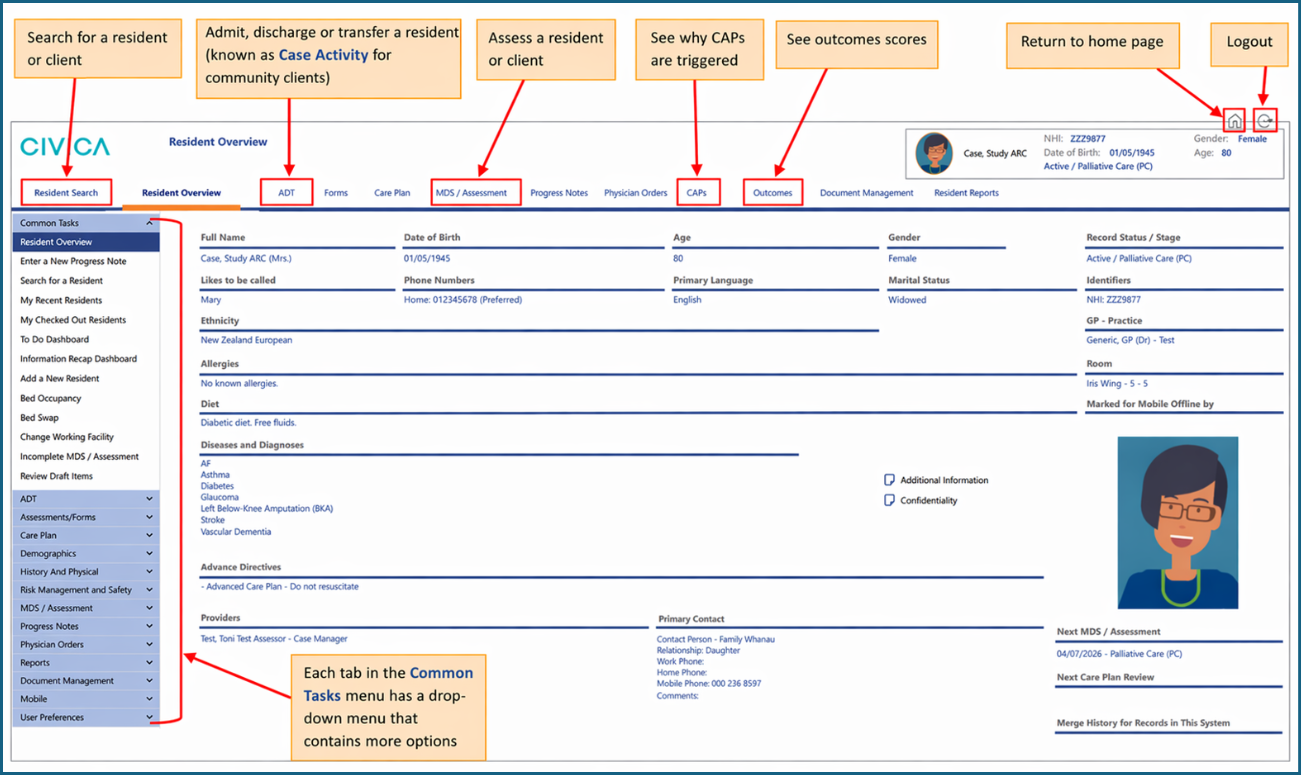
The next screenshot shows the main features of the Overview page.
Was this article helpful?
That’s Great!
Thank you for your feedback
Sorry! We couldn't be helpful
Thank you for your feedback
Feedback sent
We appreciate your effort and will try to fix the article