TABLE OF CONTENTS
- How to add notes in the interRAI Assessment Software
- Discontinuing notes
- Special note for Advance Directives and End-of-Life Instructions
You can add free-text notes to these parts of the Overview page:

- Additional information
- Allergies
- Client or resident safety concerns
- Confidentiality
- Diet
- End-of-life instructions
- Infection precautions
- Worker safety concerns
How to add notes in the interRAI Assessment Software
1: Go to the 'Client Overview' or 'Resident Overview' page.
2: Click the heading for the subject you want to add a note to, such as 'Infection Precautions' or 'Advance Directives'.
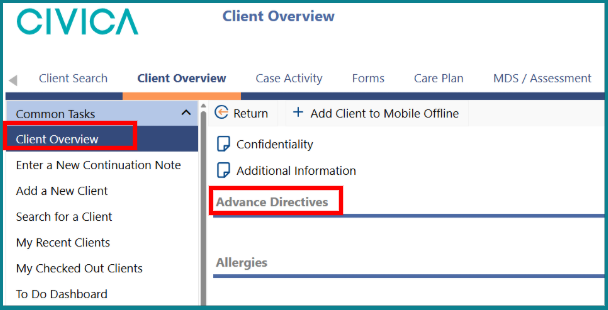
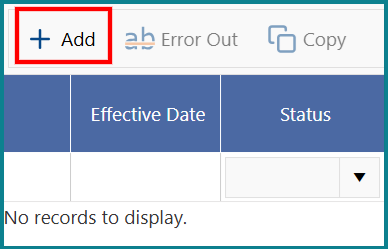
3: Click on the '+ Add' button
4: Type your note.
5: Do not add an 'End Date'.
6: Click 'Save & Return'.
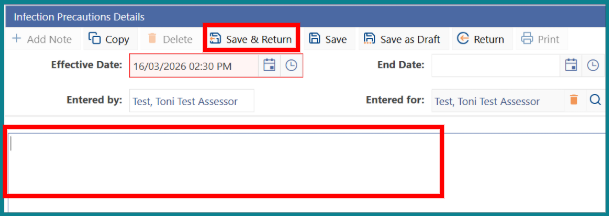

Make sure you save all notes.
Notes left as draft:
- will not appear on the Overview page
- cannot be changed by another assessor
- will not appear in printed reports
Discontinuing notes
To ensure that only one note about a subject is active, discontinue previous notes. To discontinue a note that you or someone else has made, follow these steps.
1: Click on the folder icon next to the note you want to discontinue.
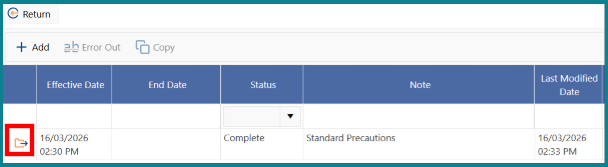
2: Enter an 'End Date'.
3: Click on 'Save & Return'.
4: On the 'Overview' page, check that only your most recent saved note is displayed.
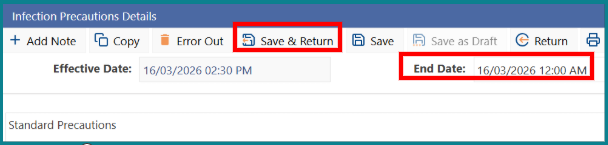

You can discontinue a note created by another person by adding an End Date.
However, you can only Error Out notes that you created yourself.
Special note for Advance Directives and End-of-Life Instructions
- Advance Directives
- End-of-Life Instructions
When a new note is added in these sections, it will automatically override the previous note.
Was this article helpful?
That’s Great!
Thank you for your feedback
Sorry! We couldn't be helpful
Thank you for your feedback
Feedback sent
We appreciate your effort and will try to fix the article