A service address is the place where the client will live while receiving services in the community.

A client can have more than one address recorded in iAS, but they can have only one service address.

For example, a second address may be recorded for another purpose, but it cannot also be entered as a second service address.
Follow these steps to add a service address:
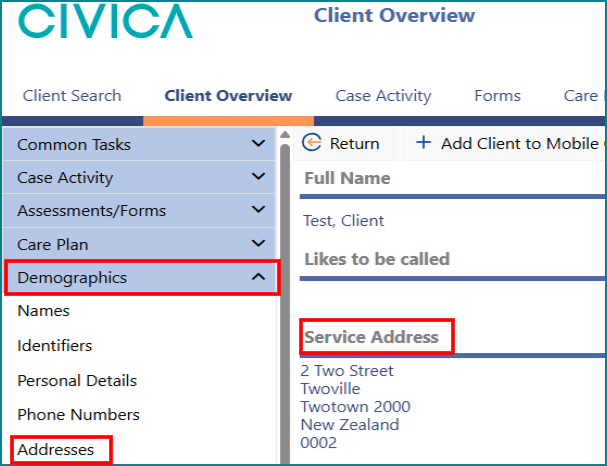
1: On the Client Overview page, open the Demographics menu.
2: Click Addresses, or click the Service Address label.
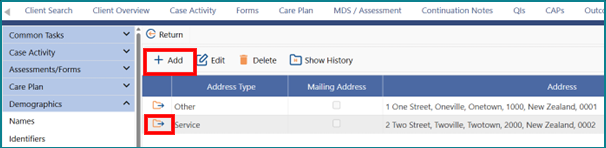
3: If a service address already exists and needs to be changed, click the folder icon to open it. If no service address has been entered yet, click Add.
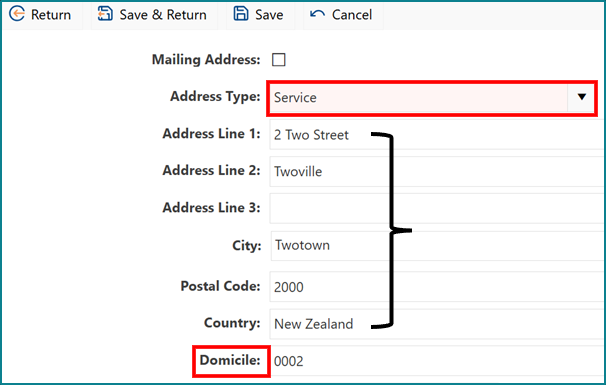
4: In the Address Type drop-down list, select Service.
5: Enter the new or altered Service Address.
6: Then enter the Domicile Code.
Important notes about the Domicile Code:
- The Domicile Code must be entered on the Overview page, within the Service Address screen.
Once entered there, it will pre-populate into the MDS assessment.
The Domicile Code identifies where a person lives and is based on neighbourhood-sized geographic areas.
The Domicile Code can only be added or changed from the Overview page on the Service Address screen.
If the client moves, you must update the Domicile Code to match their new service address.
Domicile code table link: Domicile code table
Was this article helpful?
That’s Great!
Thank you for your feedback
Sorry! We couldn't be helpful
Thank you for your feedback
Feedback sent
We appreciate your effort and will try to fix the article