Client is the term used in Community and ACC offices

Resident is the term used in the ARC facility offices.

Although the terms differ, the process is the same.
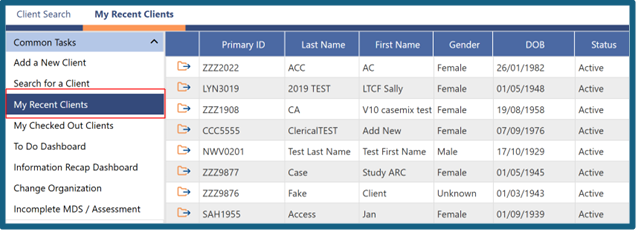
To quickly find a recent record you have used, follow these steps to view a list of the last 20 residents/clients you have recently worked with.
1: In the left-hand menu, clcik 'My Recent Residents' or 'My Recent Clients'.
2: A list of the last 20 residents/clients you have recently worked with will be displayed.
3: Click the folder icon next to the person whose record you want to open.
4: The person’s Overview page will open.
Was this article helpful?
That’s Great!
Thank you for your feedback
Sorry! We couldn't be helpful
Thank you for your feedback
Feedback sent
We appreciate your effort and will try to fix the article