TABLE OF CONTENTS
- How to add a continuation note or progress note
- Table 2.1. Categories of Continuation Notes and Progress Notes, and their descriptions.
- Filtering Continuation Notes and Progress Notes
Continuation Notes and Progress Notes are used to record and share information about a person’s care.
The function is the same in both settings. The name changes depending on the setting:
- Continuation Note is used for community clients
- Progress Note is used for facility residents
How to add a continuation note or progress note
1: Search for your client or resident.
2: Click on 'Continuation Notes' or 'Progress Notes'.
3: Click on '+ Add'.
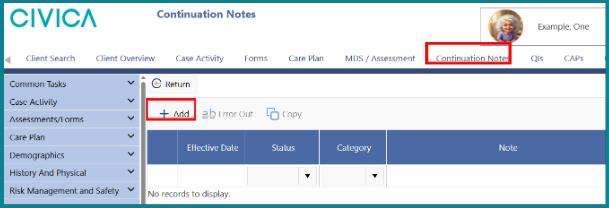
3: Type your note in the area provided.
4: Click the drop-down arrow and select the category that best describes the purpose of the note.
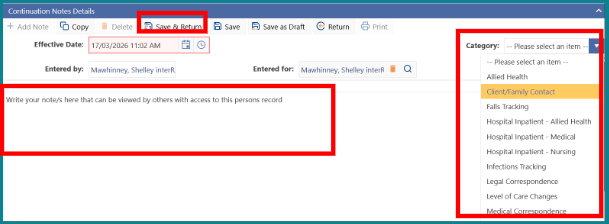
5: Click 'Save & Return'.
Table 2.1. Categories of Continuation Notes and Progress Notes, and their descriptions.
Category | Description |
Allied Health | Notes related to physiotherapy, occupational therapy, social work, and speech-language therapy. |
Client/Family Contact | Notes about communication with the client or resident, or their family. |
Falls Tracking | Notes that are automatically populated from the Falls Tracking section of the Overview page. |
HCA/Support Worker | Notes added by a health care assistant (HCA) or support worker or equivalent caring for the client or resident. This category applies mainly to residential facilities that use iAS Healthware to operate their resident-management system and whose HCAs have access to the resident files. |
Infections Tracking | Notes that are automatically populated from the Infections Tracking section of the Overview page. |
Level of Care Changes | Notes about a client’s or resident’s level of care. |
Medical Correspondence | Notes provided by a medical practitioner about medical visits and treatment directives (do not transcribe these notes). |
Merge Records | This category is used only by national software administrators. |
Providers | Notes written by organisations that provide home-support services. |
Record Administration | Notes about managing a client’s or resident’s records. |
Referrals | Notes about a client’s or resident’s referrals for assessments and services (within and outside your organisation). |
Category | Description |
Registered Nurse | Notes written by an assessor or other registered nurse involved in a person’s care. |
Respite | Notes about any short-term aged-residential-care services or home services that a client or resident has received to relieve burden on their carer(s). |
Service Coordination | Notes about planning and delivering care and services. |
Transfers | Notes about transferring a client’s or resident’s file. |
Wounds Tracking | Notes that are automatically populated from the Wound Management section of the Overview page. |
Filtering Continuation Notes and Progress Notes
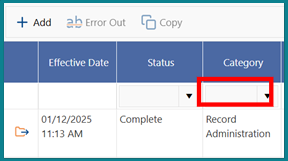
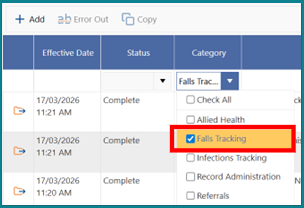
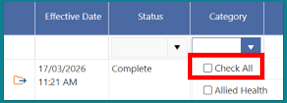

If you access a client or resident file but are not directly involved in their care, you must record the reason for access in Continuation Notes or Progress Notes.
Was this article helpful?
That’s Great!
Thank you for your feedback
Sorry! We couldn't be helpful
Thank you for your feedback
Feedback sent
We appreciate your effort and will try to fix the article