Client is the term used in Community and ACC offices

Resident is the term used in the ARC facility offices.

Although the terms differ, the process is the same.
The To Do Dashboard helps you keep track of assessments that are due.
Use it to:
- Identify upcoming assessment work
- Monitor assessments that need to be completed
- Manage your workload more efficiently
How to open the To Do Dashboard:
1: Open the 'Client Search' or 'Resident Search' page.
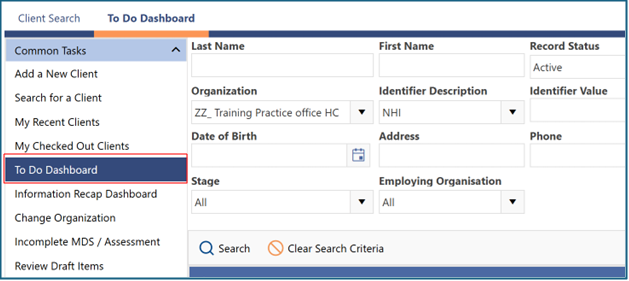
2: In the left-hand menu under the 'Common Tasks' tab, click 'To Do Dashboard'.
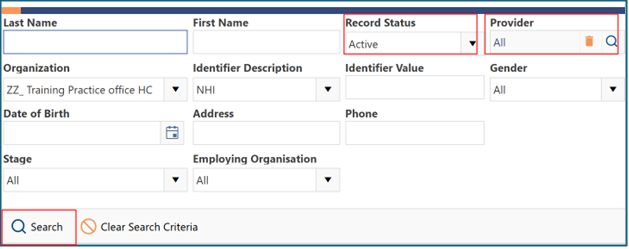
3: In the 'Record Status' drop-down list, select 'Active'. In the 'Provider' drop-down list, select the required provider, or select 'All' if appropriate and then click 'Search'.
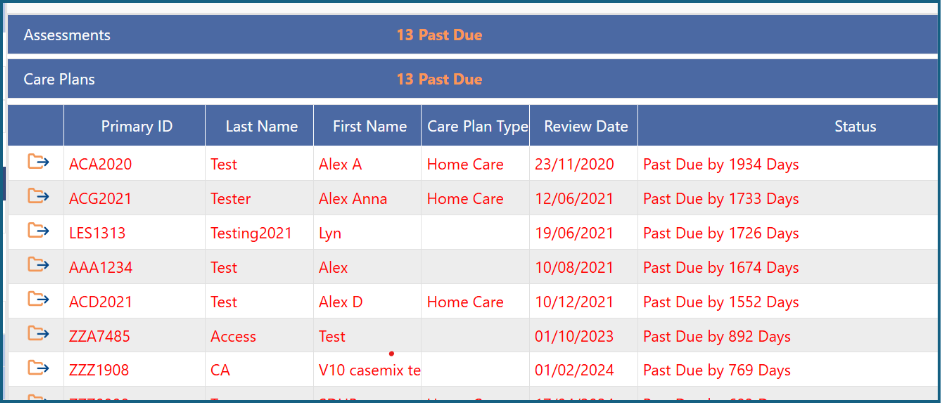
The To Do Dashboard will then display the assessments that are due. Overdue assessments are shown in red.
Was this article helpful?
That’s Great!
Thank you for your feedback
Sorry! We couldn't be helpful
Thank you for your feedback
Feedback sent
We appreciate your effort and will try to fix the article