All assessments should be marked complete within 3 working days, unless you are being trained and waiting for the interRAI educator to give you feedback. But we understand how busy an assessor's working day can be, so this report helps you easily resolve any draft assessments that have been forgotten or are no longer needed.
The quality of our interRAI data for research and planning depends on assessments being marked complete. Incomplete assessments aren't brought into the data warehouse, and information from the assessment can't be added to the aggregated data. It is important to provide high-quality data to improve knowledge and decision-making for the whole health sector.
Important Note: Please do not complete another person’s assessment. You will then become clinically responsible for the information in that assessment.
If you find incomplete draft assessments when you run the incomplete assessment report, you can choose to complete your assessments or discontinue them.
The Incomplete MDS Assessment report generates a list of people whose assessments have:
- been opened but not started
- been started but are only partially complete
- had all their information entered but have not yet been marked complete.
How to run the Incomplete Assessment report
To run the Incomplete Assessment report, follow these steps.
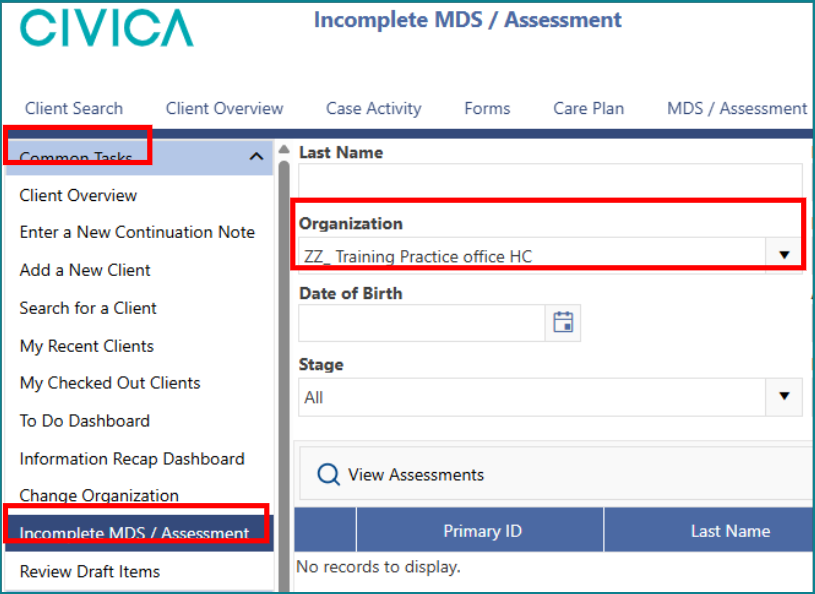
1: On the 'Client' or 'Resident Overview' page, click on 'Incomplete MDS / Assessment'.
2: Check that the organization/facility name is correct.
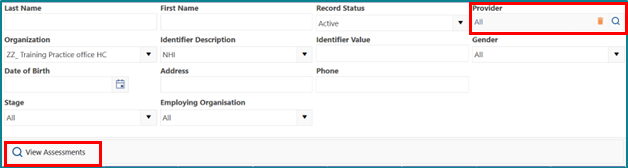
3: Search for your name as 'Provider'.
4: Click on 'View Assessments'.
5: View the list of your incomplete assessments (assessments in draft) and decide whether to complete the assessments or discontinue them.

Was this article helpful?
That’s Great!
Thank you for your feedback
Sorry! We couldn't be helpful
Thank you for your feedback
Feedback sent
We appreciate your effort and will try to fix the article