You can record contact information for a client’s or resident’s family member, whānau, or friend on the Overview page.
The Primary Contact is the only contact that displays on the Overview page. This should be the person the organisation or facility communicates with regularly, or contacts in an emergency.
If a client’s or resident’s Enduring Power of Attorney (EPOA) for welfare has been enacted, the enacted EPOA must be recorded as the Primary Contact. This is a legal requirement.
Adding a primary contact
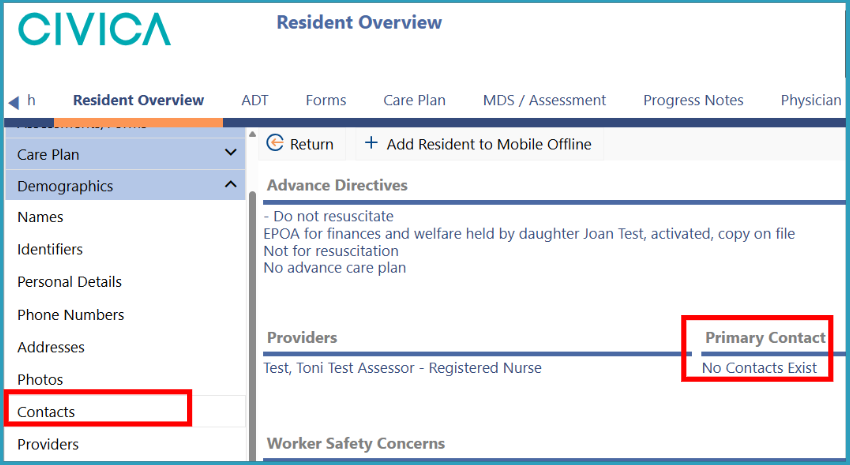
1: Go to the 'Resident' or 'Client Overview'.
2: On the left-hand side menu, click on 'Demographics' and then on 'Contacts' or you can simply click on the 'Primary Contact' on the 'Overview' screen.
3: Once on the 'Client' or 'Resident Contacts' screen, click on the '+ Add button'. 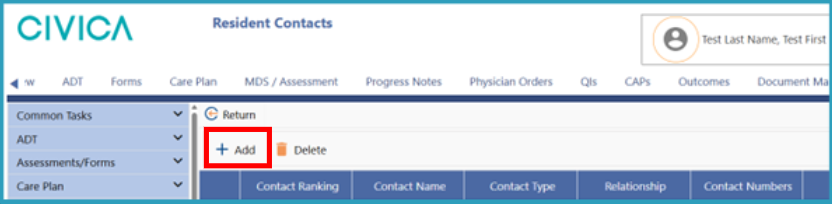
4: Then click on 'Primary'.
5: Enter the 'Contact Name' and any other contact information.
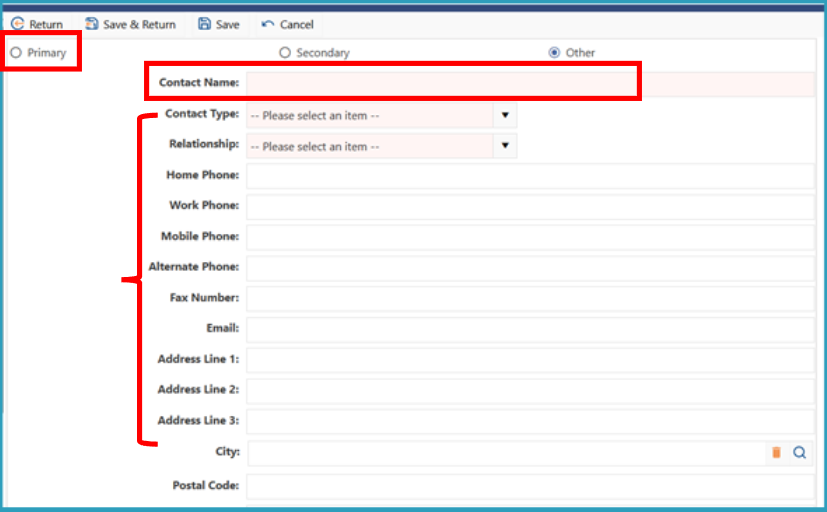
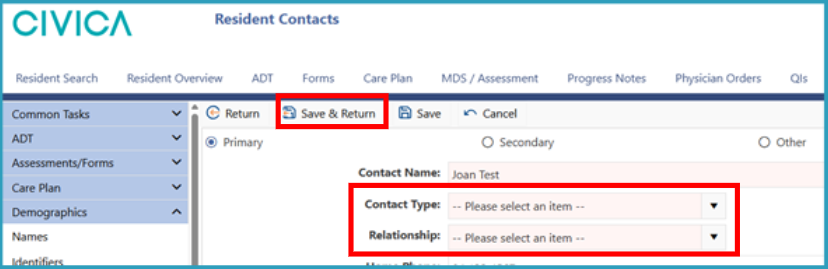
6: Select the 'Contact Type' and 'Relationship' from the drop-down menu options.
7: Click on 'Save & Return'.

If you are assessing a community-based client, you must add a Secondary Contact if the person’s primary contact lives at the same address. This is required for civil defence purposes.
You can also add additional contacts, such as other family members, whānau, or friends.
To add a Secondary Contact or Other Contact:
1: On the 'Client Contacts' or 'Resident Contacts' screen, click '+ Add'.
2: Click 'Secondary' or 'Other'.
3: Enter the relevant contact details.
4: Select the 'Contact Type' and 'Relationship' from the drop-down lists.
5: Click 'Save & Return'.
Repeat these steps for each additional contact you want to add.
Was this article helpful?
That’s Great!
Thank you for your feedback
Sorry! We couldn't be helpful
Thank you for your feedback
Feedback sent
We appreciate your effort and will try to fix the article